
Internet Connection Alert3.95 - Google Play
You'll be able to see results in few seconds.
Publisher Description

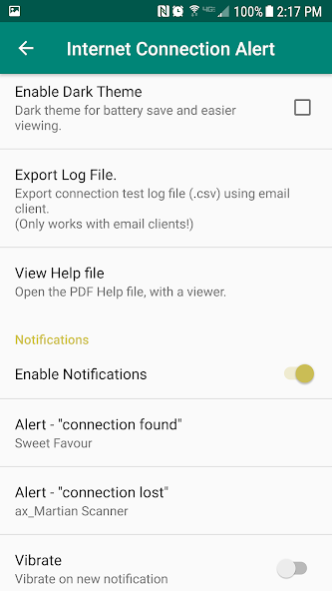

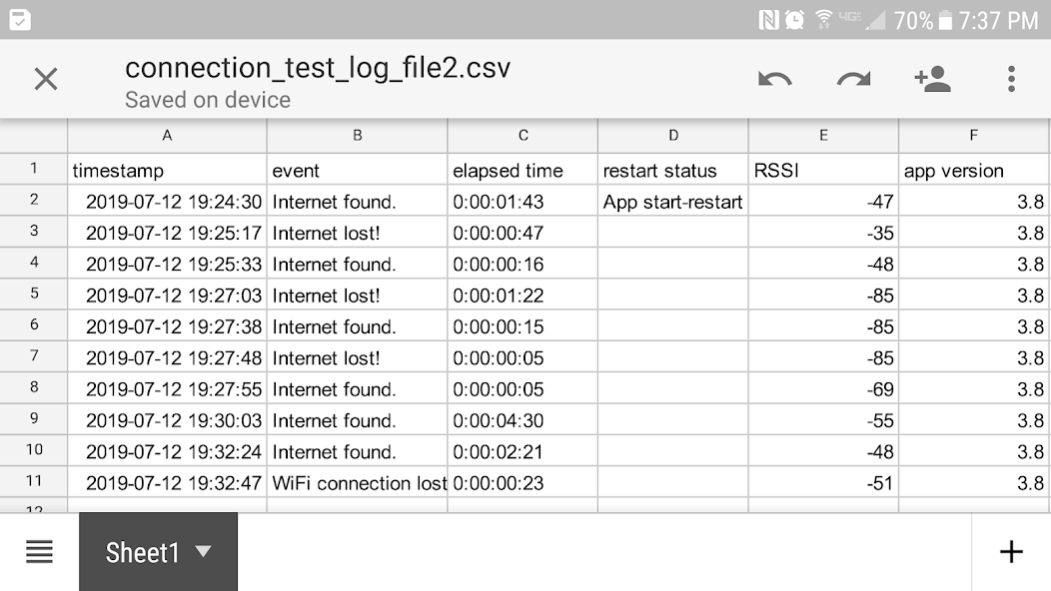
With this app, you can easily monitor the internet connection status. An audible alert sounds when the connection is lost, or found. A "connection event log", is generated in the public "Internet Connection Alert" folder. You can open and view the log, or export the log with email.
The typical use case for this app is to use your stationary, charging phone or tablet, to monitor your home internet connection, getting notifications, and creating an event log file (csv) for internet connection dropouts.
This app creates an Android " Test Service" that continues to run, even if the app is closed. When you are not using this app to test the internet connection, open the app and use the menu to "Cancel The Test Service".
The app attempts to open a connection to the internet, at a scheduled interval (1, 2, 5, 10, 15, 30, 60 minutes). 5, 10 second intervals are allowed for short 5-minute tests.
Many newer phones will go into "doze" mode when the phone is locked, preventing the App from waking and testing at every specified interval. Newer phones might have to be charging for the testing intervals to be consistent.
Disable Battery Optimization
Go to: Settings->ThisApp->Battery-> Optimize battery->All->ThisApp, and uncheck. This allows the app to wakeup consistently and test the connection, when not charging.
NOTE: This app requests the following permissions (optional):
1. "Access files and folders" - Required to create and access a public "InternetConnectionAlert" folder, for the log file and help files.
2. "Access Device Location" - Optionally required on newer phones to access the WiFi SSID (name). This SSID is used for the "Alert For Lost WiFi Connection" option. The SSID is also placed into an email if you select the "Export Log File" option.
If you initially deny these options to the app, it will still function, with limitations. To get full functionality, you may have to re-install the app, and allow these permissions.
Full Description:
When the connection status changes, from "found" to "lost, or "lost" to "found", then a "heads up" notification is displayed, and an alert is played (notifications and alerts are optional). Repeating alarm-style alerts can be used to alert continuously. Repeating alerts can only be chosen when alert sounds are setup (in the app) for the first time. A re-install is required to change repeating alerts, from the app settings page.
All "connection events" are logged to a spreadsheet-style csv file, with each new status, and the elapsed time since the connection was lost or found.
An "Alert for lost WiFi Connection" option is provided, so you can observe any lost connections directly related to losing the WiFi network. Useful when you want to be alerted if you go out-of-range of your home WiFi. When this option is not enabled on a phone, then your phone may automatically switch to mobile data if the WiFi connection is lost, and you will not get notifications.
IMPORTANT PHONE SETTINGS INFO !
Some phones, when connected with WiFi, will correctly report a lost internet connection, while other phones will silently switch to wireless 4G, 5G mode, to maintain the internet connection.
WiFi “Smart network switch” setting for phones:
When using a phone with this app, to test the internet connection, the phone's advanced WiFi option should be disabled (Android Settings). Most phones have an advanced WiFi setting to automatically switch to the phone's Mobile Network (disabled by default).
When the WiFi connection is strong, but the internet connection is lost, then the phone may silently hand-off to the Mobile Network. Under normal use of the phone, with this setting enabled, users could unknowingly use mobile data (for example, when streaming YouTube), and be subject to fees from their wireless provider.
This advanced WiFi setting has different names on various phone models:
- Smart Network switch
- Auto network switch
- Avoid bad Wi-Fi connections
- Switch to mobile data automatically
About Internet Connection Alert
The company that develops Internet Connection Alert is Blue Spectrum. The latest version released by its developer is 3.95.
To install Internet Connection Alert on your Android device, just click the green Continue To App button above to start the installation process. The app is listed on our website since 2021-06-17 and was downloaded 0 times. We have already checked if the download link is safe, however for your own protection we recommend that you scan the downloaded app with your antivirus. Your antivirus may detect the Internet Connection Alert as malware as malware if the download link to com.rakapps.internetconnectionalert is broken.
How to install Internet Connection Alert on your Android device:
- Click on the Continue To App button on our website. This will redirect you to Google Play.
- Once the Internet Connection Alert is shown in the Google Play listing of your Android device, you can start its download and installation. Tap on the Install button located below the search bar and to the right of the app icon.
- A pop-up window with the permissions required by Internet Connection Alert will be shown. Click on Accept to continue the process.
- Internet Connection Alert will be downloaded onto your device, displaying a progress. Once the download completes, the installation will start and you'll get a notification after the installation is finished.
Program Details
System requirements
Download information
Pricing
Version History
version 3.95
posted on 2021-06-17
Unexpected Permissions Request errors are trapped and pop-up messages are displayed.
Storage and Location permissions required on most newer phones. User can deny permissions, but app will have limited functionality. (no log file, no help file, no lost WiFi alert).
Help file is updated with instructions to disable an app's battery optimizations, to allow test scheduling to be consistent when running on battery.
Disclaimer
Official Google Play Link
We do not host Internet Connection Alert on our servers. We did not scan it for viruses, adware, spyware or other type of malware. This app is hosted by Google and passed their terms and conditions to be listed there. We recommend caution when installing it.
The Google Play link for Internet Connection Alert is provided to you by apps112.com without any warranties, representations or guarantees of any kind, so access it at your own risk.
If you have questions regarding this particular app contact the publisher directly. For questions about the functionalities of apps112.com contact us.
